
Waterstream 1.7.0 verifies JWTs against a JWKS endpoint, with a one-line shorthand for Azure Entra ID. MQTT v5 Enhanced Authentication lets a long-lived session swap tokens mid-flight without a reconnect.
Before 1.7.0, configuring JWT authentication meant pinning a single signing key in the broker’s config. That works against an IdP that rarely rotates. It does not work against Azure Entra ID, which rotates JWKS keys on its own schedule. Any token signed with a kid the broker hasn’t been told about gets rejected. 1.7 closes that gap: the broker fetches keys at runtime and refreshes when an unknown kid shows up.
The generic JWKS flow
Five new environment variables expose the JWKS path:
JWT_JWKS_URL: the URL of the JWKS documentJWT_EXPECTED_ISSUER: the value theissclaim must matchJWT_PRINCIPAL_CLAIM: which claim becomes{username}in ACL rules (defaults tosub)JWT_ORGANIZATION_CLAIM: which claim populates{organization}JWT_ENTRA_ID_TENANT_ID: the Entra ID shorthand (see below)
A generic OIDC setup looks like this:
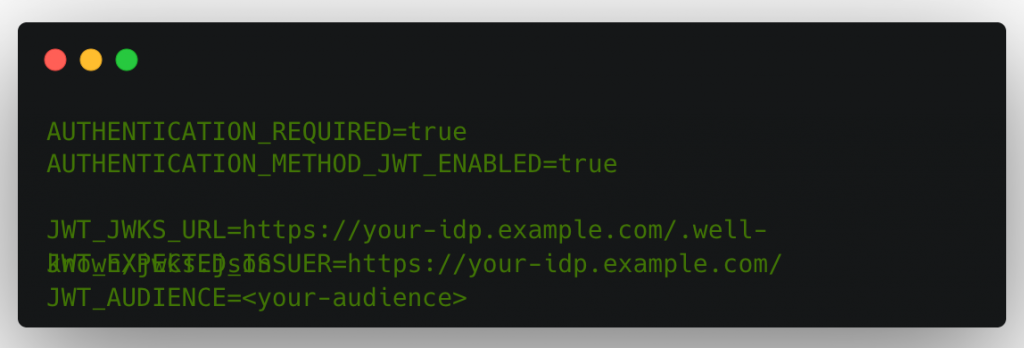
The cache is keyed by kid. A 60-second floor between refreshes prevents a flood of bad tokens from hammering the IdP. The static key options (JWT_VERIFICATION_KEY, JWT_VERIFICATION_KEY_BASE64, JWT_VERIFICATION_KEY_PATH) still work for setups that don’t need rotation, but the broker refuses to start if you mix them with JWT_JWKS_URL.
The Entra ID shorthand
If your IdP is Azure Entra ID, setting the tenant ID is enough:
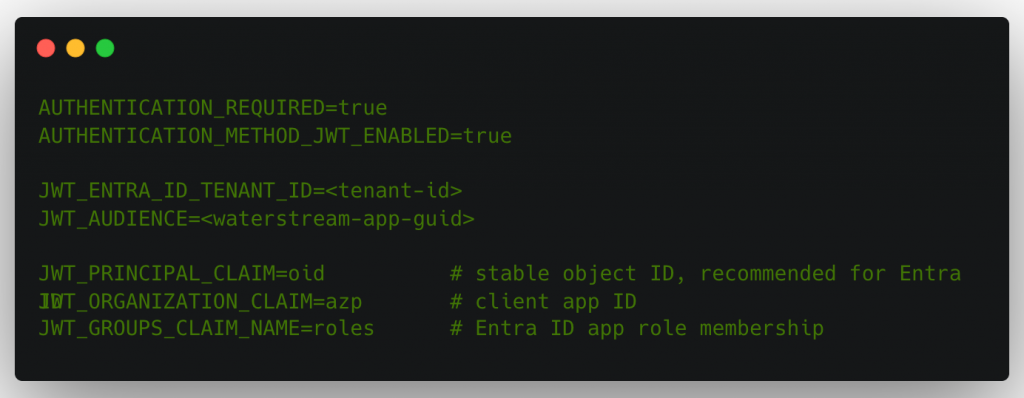
JWT_JWKS_URL and JWT_EXPECTED_ISSUER are derived from the tenant ID:
| Setting | Derived value |
|---|---|
JWT_JWKS_URL | https://login.microsoftonline.com/<tenant-id>/discovery/v2.0/keys |
JWT_EXPECTED_ISSUER | https://login.microsoftonline.com/<tenant-id>/v2.0 |
If you need to override either one (a sovereign Azure cloud, a multi-tenant app), the explicit env vars still win.
Entra ID access tokens carry the bare app GUID in the aud claim, not the full api://<guid> URI. Set JWT_AUDIENCE to the GUID, or token validation fails with a perfectly valid-looking token in hand.
Claims, mapped to ACL placeholders
The same claims that authenticate the client also drive authorization. The new variables expose three placeholders for the ACL engine:
| JWT claim | Config | ACL placeholder |
|---|---|---|
oid (Entra) / sub (generic) | JWT_PRINCIPAL_CLAIM | {username} |
azp / appid (Entra) | JWT_ORGANIZATION_CLAIM | {organization} |
roles (Entra) / groups (generic) | JWT_GROUPS_CLAIM_NAME | {group} |
So a rule like t/{organization}/{username}/# automatically scopes a client to a topic prefix built from its calling app and stable object ID, no extra mapping layer required.
Refreshing tokens without dropping the session
Entra ID tokens live for about an hour. If your MQTT clients reconnect every hour to swap tokens, you lose any session state that wasn’t persisted, and you pay the cost of re-subscribing every active topic. For long-lived sessions on resource-constrained devices, that’s expensive.
MQTT v5 has an answer: Enhanced Authentication. The token rides in the CONNECT packet’s Authentication Method and Authentication Data properties instead of User Name and Password. Waterstream 1.7 supports it, with JWT as the only currently registered method:
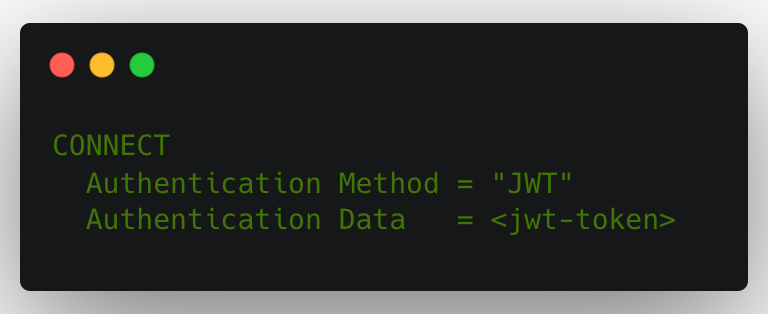
The legacy User Name = JWT / Password = <token> flow still works and is the only option for MQTT 3.1.1 clients.
In-session re-authentication is the point. A v5 client that connected with Enhanced Authentication can send an AUTH packet at any point with a fresh token. Waterstream validates the new token, acknowledges the packet, and the session continues uninterrupted, with the expiry timer advanced to the new token’s exp. Subscriptions stay live. In-flight QoS 1 and 2 messages aren’t lost. The TCP connection isn’t touched.
Trigger re-auth at 75–80% of the current token’s lifetime so the refresh lands before the broker re-checks expiry. If a re-auth fails, the broker disconnects the session and includes a Reason String property worth logging on the client.
Where to read more
Full configuration reference is in the Authentication section of the config guide, with worked examples for both the generic JWKS flow and Entra ID. The MQTT v5 Enhanced Authentication section covers Eclipse Paho and HiveMQ client snippets for the CONNECT and reauth flows.
Waterstream 1.7.0 is out now. Request a development license and point the broker at your Entra ID tenant, or talk to an architect if you’d rather walk the auth flow through with us.